


Marimba, Xylophone, Vibraphone
4.8142.00 Reviews
App Specs
- Version
- 2.6
- Updated On
- License
- Free
- Downloads
- 500,000+
- Developer
- sonOS
- Categories
- Music
- Platform
- Android
Screenshots
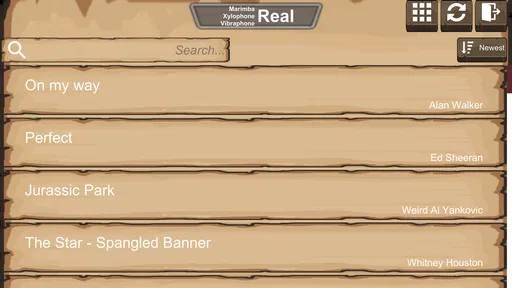
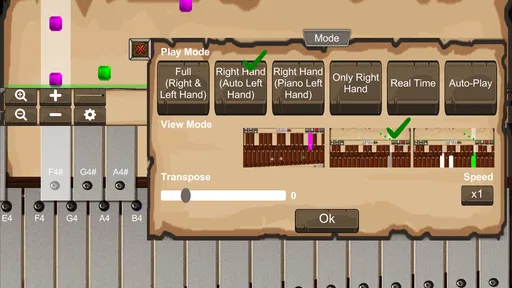
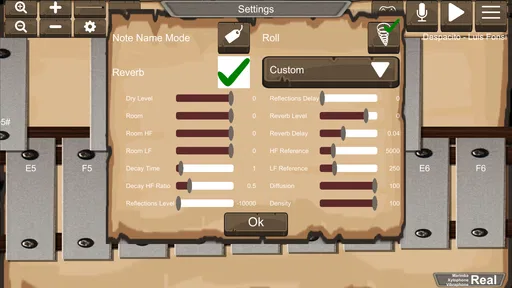
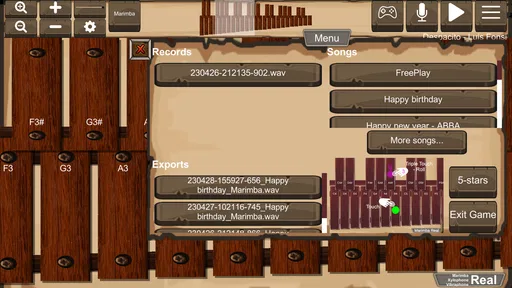
 Analysis by AppCompare
I enjoy music apps most when they let me make sound immediately instead of turning a simple idea into a long setup process. Marimba, Xylophone, Vibraphone is built around that direct approach: it puts a set of mallet instruments on the screen and lets me play them by tapping. Developed by sonOS, this free music game is aimed at casual playing, basic rhythm practice, and anyone who wants a quick digital substitute for a small percussion instrument.
After spending time with it, I see the appeal clearly. It is not trying to replace a full keyboard, a recording studio, or a serious music-learning platform. Its strength is narrower and more approachable: it gives you a playable surface for marimba, xylophone, vibraphone, and glockenspiel sounds without asking you to understand music production first. The best reason to install it is convenience: a small percussion playground that is ready whenever you have a few spare minutes.
How the current version feels to use
The current release is version 2.6, and the app remains focused on its central idea rather than surrounding it with unrelated tools. That focus makes the first session easy. I can open it, choose a sound, and begin tapping notes without preparing a project or learning a complicated interface. For a child, a beginner, or a curious adult, that low barrier matters more than a long feature list.
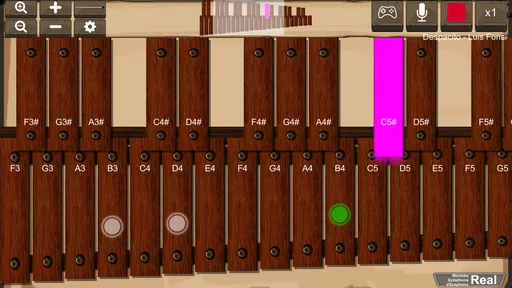
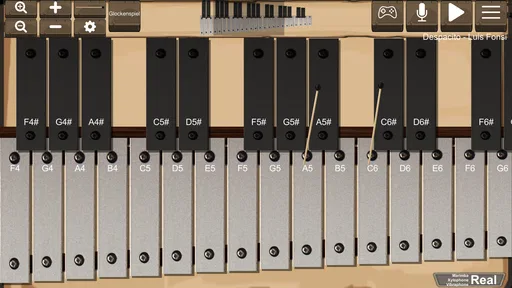
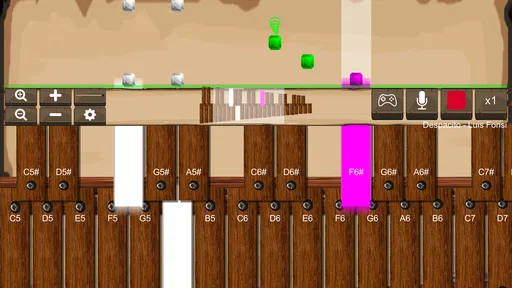
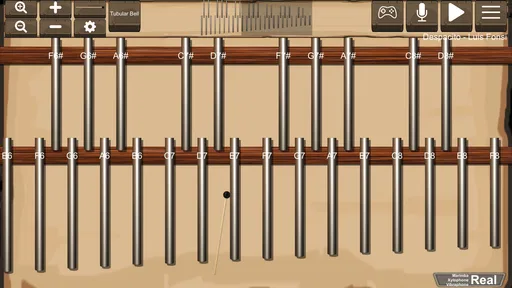
The instrument selection is the main point of interest. A marimba and xylophone can both suggest warm, wooden percussion, while a vibraphone brings a smoother, more ringing character. The glockenspiel has the brighter, sharper tone many people associate with small metal bars. Switching between these choices changes the mood of the same short melody, which gives the app more replay value than a single-sound toy.
I found the experience most enjoyable when treating it as a sketchpad. Instead of expecting a complete song, I used a few notes to test a melody, imitate a familiar rhythm, or experiment with how the same phrase feels on different instruments. That is an important distinction. This is a playable instrument app presented in the music category, but it is also labeled as a game, so it works best when the goal is relaxed interaction rather than formal practice.
The age rating is Everyone, which fits the uncomplicated concept. There is no need for advanced musical knowledge to understand what to do. A young user can explore individual notes, while an older user can use the app for quick rhythm experiments. Naturally, the quality of the experience still depends on the device screen. A larger phone or tablet gives each bar more room and makes deliberate playing easier than a compact display.
It is also useful to keep expectations realistic about touch input. A physical mallet instrument responds to pressure, spacing, resonance, and the movement of both hands in a way a phone cannot fully reproduce. On a touchscreen, accuracy depends on where and how quickly I tap. That makes the app convenient, but it also means it is better for casual playing and idea testing than for developing the exact technique needed on a real marimba or xylophone.
Worth Reading Before You Choose

EA SPORTS FC Mobile 26 Is a Bigger Football Game, but It Takes Time

Flipboard Shows What News Apps Must Do Beyond the Feed

Switching to Android Auto Means Rethinking Your Driving Routine

Google Calendar Makes a Crowded Week Easier to Manage

Ludo King Makes the Most of the Minutes Between Plans

Baby Panda World Brings Quick Play to Modern Phones, but Its Game Library Feels Busy
What changed over the product’s life
Marimba, Xylophone, Vibraphone was released on March 1, 2019, and its continued presence in the catalog suggests a product that has stayed available rather than disappearing after a short experiment. The current version gives new users a clear reference point: they are trying the maintained form of the app, not an abandoned prototype. I would still approach version history carefully, because a version number alone does not explain whether an update changed sound quality, layout, compatibility, or only internal details.
What can be said with confidence is that the app has reached a mature stage without losing its original identity. The central instrument concept is still easy to understand, and the developer, sonOS, has kept the experience recognizable. For existing users, that kind of continuity can be welcome. Someone who installed it earlier is not suddenly confronted with a completely different type of product, while a new user can understand its purpose in a few seconds.
The practical effect of moving to version 2.6 is less about learning a new system and more about receiving the current form of a straightforward tool. If you already use it for occasional melodies, the familiar workflow is a benefit. You can return to the same kind of play without rebuilding your habits. If you are hoping for a large evolution into a full music workstation, however, this release should not be judged by that expectation. Its identity remains centered on virtual percussion instruments.
Compatibility is also reasonably broad for an older device. The app requires Android 6.0 or later, so people with very old phones may be excluded, but many users with established Android hardware can try it without needing a recent flagship. That matters for a lightweight music toy because the people most likely to enjoy it may be using a spare phone, a family tablet, or an older device rather than dedicated music equipment.
Small workflows that make it more useful
One effective way to use the app is to separate melody discovery from instrument choice. I first tap a simple phrase on whichever sound is easiest to hear, then repeat it on the other instruments. This prevents the bright attack of the glockenspiel from deciding too quickly whether the notes themselves work. A phrase that sounds playful on one setting may feel calmer or more polished on another, and this comparison is a better use of the app than simply tapping randomly.
Another useful habit is to practice short patterns rather than attempting long pieces. I might choose three or four notes and repeat them at a steady pace, then change the order. This gives the touchscreen a manageable job and makes timing easier to judge. It is not a substitute for structured lessons, but it can help someone become more comfortable with basic repetition, simple melodic shapes, and listening for consistency.
The app can also fit into a family setting. A parent could let a child explore the different timbres, then ask the child to recreate a short rhythm or identify which instrument sounds brightest. That turns free play into a small listening exercise without making the session feel like homework. Because the concept is self-explanatory, I would choose this over a much more elaborate music app when the aim is five minutes of supervised experimentation.
For songwriting, I would use it as a first-pass idea tool. If a melody appears while I am away from a piano, I can tap the notes to check whether the contour feels right. The limitation is that a touchscreen instrument is not automatically a reliable place to preserve the idea. I would treat the result as a memory aid or a quick demonstration rather than assuming it provides the editing, arrangement, or export workflow of a dedicated composition app.
A fourth, less obvious use is sound selection for a simple performance concept. The same note sequence can suggest a nursery-style phrase on glockenspiel, a more rounded percussion line on marimba, or a gentler color on vibraphone. Comparing those choices helps me decide what kind of character I want before moving to a real instrument or another music tool. That makes the app valuable even when it is not the final destination for the idea.
Where it stands beside other music options
Compared with a physical xylophone, this app wins on portability and variety. I do not need to store an instrument, carry mallets, or find a quiet place with enough room. It is available on a device I may already have with me, and the multiple instrument choices give more tonal variety than a single small toy instrument. The physical alternative wins decisively for tactile feedback, acoustic resonance, and learning how to control real bars.
Compared with a virtual piano, the percussion focus gives this app a different personality. A piano app usually offers a broader melodic range and may feel more natural for chords, accompaniment, or conventional lessons. This app is more inviting if I specifically want the bright, struck quality of mallet instruments. I would pick the piano alternative for harmony and formal keyboard practice, but I would pick this one for a quick rhythmic melody or a more playful sound.
Full music-production apps are more capable in nearly every technical area: arranging, recording, effects, sequencing, and editing. They are also heavier experiences that can overwhelm someone who only wants to tap a few notes. Marimba, Xylophone, Vibraphone makes the opposite trade-off. It sacrifices production depth for immediacy. That is not a weakness for every user; it is exactly why a beginner may open it more often than a powerful studio app.
There is also a difference between this and rhythm games that judge timing or present levels. Here, I would not install it expecting a progression system, challenges, or competitive goals. The satisfaction comes from making the sound myself. If I need feedback that tells me whether I hit a beat correctly, a dedicated rhythm trainer is likely a better choice. If I want an open-ended instrument surface without pressure, this app is the more comfortable option.
Who will enjoy it, and who should skip it
I recommend it to curious beginners, families looking for a simple music activity, and casual players who like experimenting with sound. It also suits musicians who want a quick way to test a tiny melodic idea when a real instrument is unavailable. The free price removes the biggest barrier to trying it, and the broad Everyone rating makes it easy to consider for shared use.
The audience figures support that sense of accessibility: it has passed 500 thousand installs and holds an average rating of 4.8 from around 2.9 thousand ratings. Those numbers do not guarantee that every device or playing style will feel perfect, but they do show that the simple concept has found a substantial audience. There are also 142 written reviews, enough to indicate that people have engaged with it beyond a single accidental download.
I would skip it if my priority is serious instrumental technique. The screen cannot provide the physical spacing, rebound, or acoustic response of a real marimba. I would also look elsewhere if I need multitrack recording, notation, saved compositions, lessons, or a structured game loop. Installing it with those expectations would make the app feel incomplete, even though those omissions are consistent with its compact purpose.
People who dislike tapping on small interfaces may also become frustrated. A phone can make quick notes feel cramped, particularly when both hands are involved or when I try to play faster passages. A tablet should be more comfortable, but the app’s usefulness still depends on the device and the user’s patience. This is one of those cases where a simple design does not eliminate the physical limitations of mobile input.
Questions I would consider before installing
If you are wondering whether it is suitable for a child, I would say yes for supervised casual exploration, especially because the content rating is Everyone and the basic interaction is easy to understand. I would not present it as a complete music curriculum. A child can explore pitch and rhythm with it, but meaningful progress in mallet technique still requires instruction and a physical or more specialized learning setup.
If you are asking whether it can replace a real instrument, my answer is no, though it can fill a useful gap. It is excellent when portability matters or when you want to test an idea quietly. It cannot reproduce the feel of striking a bar, the natural sustain in a room, or the coordination required by a full-size instrument. Think of it as a convenient miniature instrument interface rather than a complete hardware replacement.
If you want to make a finished song, I would use it at the beginning of the process, not the end. Tap a motif, compare the available tones, and then move the concept into a tool designed for recording or arranging. That workflow respects what the app does well while avoiding the disappointment of expecting production features from a focused instrument game.
If you are concerned about whether an older Android phone can run it, the minimum requirement is Android 6.0. That makes the compatibility question straightforward: check the device’s operating system before installing. Newer hardware may offer a more comfortable screen and touch response, but the app does not demand the newest generation of phone simply because it belongs to the music category.
What I would like to see next
For future development, I would be most interested in improvements that preserve the directness of the current experience. Better support for comparing instruments, more comfortable play on different screen sizes, or gentle ways to turn a short idea into a repeatable practice exercise would add value without changing the app into a complicated studio. Those are reasonable areas to watch, but they are possibilities rather than promises.
I would also pay attention to how sonOS balances simplicity with depth. Adding too many controls could make the app less welcoming, while leaving the experience entirely static could limit its long-term appeal for returning users. The strongest path would be optional depth: beginners could keep tapping immediately, while more experienced users could access a little more control when they need it.
For now, my recommendation is uncomplicated. Marimba, Xylophone, Vibraphone is a good free choice when you want mallet-style sounds in a compact, approachable format. Its current version keeps the original idea clear, and its large user base suggests that the straightforward design works for many people. I would not confuse it with a professional instrument simulator or a full music-making suite, but I would happily suggest it to a friend who wants a quick musical distraction, a child-friendly sound experiment, or a portable way to sketch a melody.
Pros
- Responsive touch controls make notes easy to play.
- Multiple mallet instruments offer varied tones and styles.
- Useful for practicing melodies
- scales
- and simple songs.
- Clean interface is suitable for beginners and casual players.
- Works well for quick musical experiments without extra equipment.
Cons
- Sound quality depends heavily on your device’s speakers or headphones.
- Small screens can make accurate note selection difficult.
- May feel limited for advanced musicians seeking recording tools.
- Extended play can become repetitive without more lesson content.
- Some features may require ads or in-app purchases.
FAQs for Marimba, Xylophone, Vibraphone
What is Marimba, Xylophone, Vibraphone, and who is it designed for?
Marimba, Xylophone, Vibraphone is a virtual percussion instrument app that lets you play melodic notes by tapping wooden or metal-style bars on your device. It is suitable for beginners, music students, casual users, and anyone who wants to experiment with rhythms and melodies without owning a physical instrument. The simple layout makes it approachable, although experienced musicians may find the mobile controls less expressive than a real instrument.
Does the app work well for learning musical notes and practicing songs?
The app can be useful for learning note positions, practicing short melodies, and becoming familiar with the layout of a marimba, xylophone, or vibraphone. Tapping individual bars is straightforward, and the visual feedback helps beginners connect notes with their sounds. However, it should be considered a practice and experimentation tool rather than a complete music course, since it may not include structured lessons, sheet music, or advanced technique guidance.
Can I use headphones or external speakers with Marimba, Xylophone, Vibraphone?
Yes, the app can generally be used with your device’s built-in speaker, wired headphones, Bluetooth headphones, or external speakers, depending on your phone or tablet. Headphones are especially helpful when practicing in public or when you want to hear the instrument more clearly. Keep in mind that Bluetooth devices can introduce a small delay, which may affect fast playing and precise rhythm work.
Is Marimba, Xylophone, Vibraphone free to download, and does it contain advertisements?
The app’s availability, pricing, and advertising model may vary depending on whether you download it from Google Play or the Apple App Store and which version is currently published. Many free music apps include advertisements or optional paid features, so it is worth checking the store listing before installing. Review the permissions, in-app purchase details, and subscription information carefully if those options are shown.
What should I check if the sound is missing or the app does not respond correctly?
If you cannot hear the instrument, first check your device volume, silent mode, media output, and connected Bluetooth accessories. Closing and reopening the app can also resolve temporary problems, while restarting the device may help with performance issues. Make sure you are using a supported Android or iOS version and have installed the latest update. If touch response remains unreliable, test the screen in another app to rule out a device problem.


